If you value cloud convenience over absolute control, this might not be for you. PassSafer is built strictly for those who take digital privacy seriously. No cloud, no subscriptions, no compromises. Your data never leaves your machine.
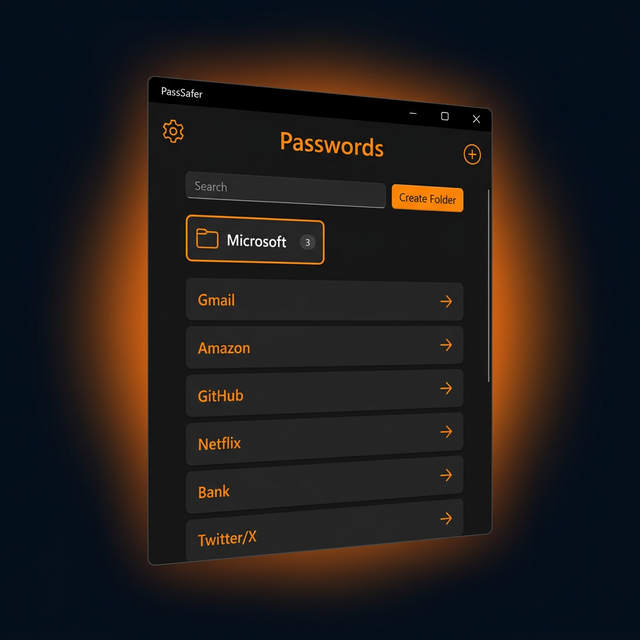
See exactly what you're getting before you buy. A full walkthrough of PassSafer in under 2 minutes.
Everything you need to keep your passwords safe, organized, and completely under your control.
Store all your passwords in one secure place. No more sticky notes or forgotten credentials.
A native Windows application, no browser needed. Runs locally on your PC with a smooth, modern interface.
Your data is unreadable, even for hackers. Bank-grade AES-256-CBC encryption with PBKDF2 key derivation keeps your secrets safe.
No cloud. Your data never leaves your computer. Complete privacy, zero external risk.
Encrypt and store sensitive files up to 100 MB. IDs, recovery keys, certificates, all securely attached to your entries.
Intuitive, modern interface, ready to use immediately. No learning curve, no setup hassles.
No subscriptions, no recurring fees. Buy once, use forever. It's that simple.
Professional dark mode interface with orange accents. A beautiful, fluid single-page application.
Built with security-first thinking and packed with features that make password management effortless.
Master password + 6-digit PIN for an extra layer of security every time you log in.
Create and restore fully encrypted backups including file attachments with a separate backup password.
10 minutes idle = automatic logout. Walk away knowing your passwords stay protected.
Create folders to organize your secrets. Keep work, personal, and finance passwords separate.
Generate strong, cryptographically secure random passwords instantly. Customize length, characters, and complexity.
Attach and encrypt files up to 100 MB per entry. Scans, certificates, recovery keys, all stored securely in your vault.
Copied passwords are automatically cleared from your clipboard after a short time for extra protection.
After 5 failed login attempts, access is temporarily locked to prevent unauthorized entry.
See how PassSafer compares to cloud-based password managers.
| Feature | PassSafer | Cloud Managers |
|---|---|---|
| Data stored locally | โ | โ |
| No subscription fees | โ | โ |
| No cloud breaches possible | โ | โ |
| Works without internet | โ | โ |
| One-time payment | โ | โ |
| Encrypted file vault | โ | โ |
| AES encryption | โ | โ |
Most password managers charge $4-5/month. That's $40-60/year. With PassSafer, you pay once and own it forever.
FIRST100
at checkout for $20 off. Only 94 spots left!
Getting started with PassSafer takes less than 2 minutes.
Purchase and download PassSafer. Run the installer on your Windows PC.
Create your master password and 6-digit PIN. This is your vault's only key.
Add your passwords, organize them in folders, and generate new strong ones.
Real feedback from real PassSafer users. No edits, no filters.
"Super safe app!" PassSafer keeps my passwrds lokally encryped. No cloud bulshit, dark mode looks great. Totaly reccomend!
"Love the backups" Exporting vault with files is easy peasy. Got it cheap with FIRST100 code for 17.99โฌ. Best deal everr.
"Pw generator rocks" Makes strong passwords quick. Folders help organize stuff. UI cud be a bit faster sometimes.
"Files safe now" Attached my ID scan (under 100MB) โ super secure. Auto logout after 10min is smart. Thx!
"Ok but no phone" Good local storage and strong encryption. But no mobile app? Meh.
"Ditched my old manager" No more cloud worries, zero knowledge realy works. Dark theme is nice at nite. Awesome!
With great security comes great responsibility. Please read carefully.
There is no recovery option. Your security means no backdoors, for anyone. Write your master password down and keep it somewhere safe.
Use the built-in export function to back up your data regularly. Keep backups in a safe, separate location.
We are not liable for data loss or lost passwords. Your data is 100% in your hands, that's the point.
PassSafer is currently available for Windows (.exe). Mac and Linux versions may be considered in the future.
Use the built-in export feature to create regular backups. You can restore your passwords from a backup file on any machine with PassSafer installed.
Yes. AES-256 is the gold standard in encryption, used worldwide by governments and security agencies. It would take billions of years to brute-force.
Don't just trust, verify. The core encryption engine is open-source. You can review and audit the code yourself on GitHub.
You can install PassSafer on your computers and use the import/export feature to transfer your encrypted password database between them.
Yes! You can encrypt and attach files up to 100 MB to any password entry, perfect for storing ID scans, certificates, or recovery keys.
Yes, future updates will be available. Your one-time purchase includes access to updates for the product.
Our support team is here for you. We aim to respond to all inquiries within 24 hours.
Your passwords, your files, your rules. No cloud, no subscriptions. Just security.
Buy Now - $17.99 One-TimeOnly 94 Early Bird spots remaining. Code FIRST100 at checkout.